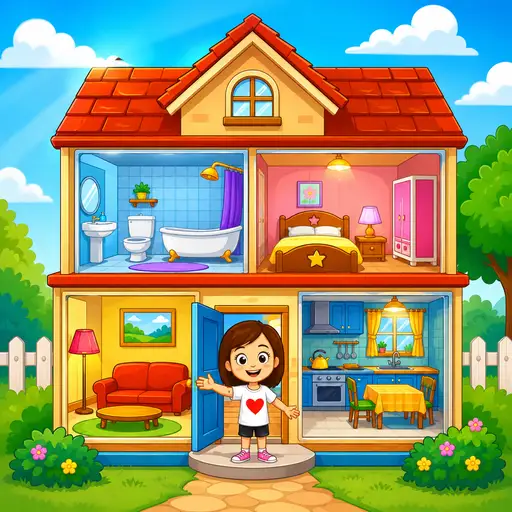










My Town Home: Family Playhouse
- Rating
- Not rated yet
- Played
- 1
- Developer
- My Town Games Ltd
- Category
- Cooking
- Released
- 2026
- Last Updated
- September 26, 2026
- Technology
- HTML5
- Platforms
- Browser (desktop, mobile, tablet)
About My Town Home: Family Playhouse
My Town Home: Family Playhouse is an interactive digital dollhouse that invites players to explore, decorate, and create stories within a fully furnished two-story home. Unlike structured puzzle games with rigid objectives, this life simulation experience focuses on open-ended creativity and roleplay. You are free to wander through multiple rooms, interact with household objects, and craft your own family narratives without time limits or scoring pressure.
Explore and Customize Your Space
The core appeal of My Town Home: Family Playhouse lies in its detailed environment. Players can cook meals in the kitchen, tend to plants in the garden, or rearrange furniture to suit their aesthetic preferences. Every item is interactive, encouraging experimentation and imaginative play. If you enjoy the satisfaction of organizing and decorating living spaces but prefer a more narrative-driven approach than pure design titles like Home design - decorate house, this game offers a cozy alternative where decoration serves storytelling rather than level progression.
This title also appeals to fans of family-centric simulations who want a relaxing sandbox. While games such as Angela Twins Family Day focus on specific daily routines and mini-games, My Town Home: Family Playhouse provides a broader canvas for unscripted moments. There are no wrong ways to play; whether you are hosting a virtual dinner party or simply exploring hidden interactions in the attic, the game supports your creative vision.
A Cozy Experience for All Ages
Although listed among adult puzzles for its stress-relieving qualities, the game maintains a wholesome, all-ages aesthetic typical of the My Town series. It runs smoothly in any modern browser, making it accessible for quick creative sessions on desktop or mobile. For players who appreciate domestic themes but crave variety beyond traditional match-3 renovations like Homescapes, this dollhouse adventure delivers genuine freedom. The absence of ads or paywalls in this web version ensures uninterrupted immersion, allowing you to focus entirely on building your perfect virtual home and family stories at your own pace.
How to Play My Town Home: Family Playhouse
To begin, simply load the game in your browser and select a character or enter the house directly. There is no tutorial overlay; instead, you learn by clicking or tapping on objects to discover their functions. Navigate between rooms using the on-screen arrows or swipe gestures on touch devices to explore the entire two-story layout.
Your primary objective is self-directed: create scenarios, arrange items, or simply relax in the space. Interact with furniture, appliances, and characters by selecting them. Some objects trigger animations or sound effects, while others can be moved or combined to set up scenes for your family stories.
Progression is entirely personal since there are no levels to complete. Save your progress by logging in if you wish to return to your customized setup later, or treat each session as a fresh creative slate. The game encourages experimentation, so try interacting with everything to uncover hidden details and maximize your playhouse experience.
My Town Home: Family Playhouse Controls
- Mouse click — interact with objects and characters
- Left arrow / Right arrow — navigate between rooms
- Touch tap — select items on mobile devices
- Swipe left / right — change rooms on touchscreen
- Drag and drop — move furniture and characters
Features
- Fully interactive two-story dollhouse with multiple themed rooms
- Open-ended gameplay with no timers, scores, or forced objectives
- Extensive object interaction including cooking, gardening, and decorating
- Cross-platform compatibility for seamless play on PC and mobile
- Save system via account login to preserve custom layouts
- Wholesome family-friendly aesthetic suitable for all ages
Tips and Tricks
- Click every object at least once to discover hidden animations and interactive elements throughout the house.
- Use the garden area to gather flowers and produce that can enhance indoor decorating scenes.
- Experiment with character placement to create dynamic family vignettes before taking screenshots.
- Log in early if you plan to build an elaborate setup so your progress is automatically saved.
- Combine kitchen items to simulate meal preparation sequences for more immersive storytelling.
More Games Like My Town Home: Family Playhouse
FAQ
Yes, the browser version is completely free with no mandatory purchases or subscriptions required to access the full dollhouse experience.
Absolutely. The game is optimized for both desktop and mobile browsers, supporting touch controls for seamless play on iOS and Android devices.
No, My Town Home: Family Playhouse is a single-player experience focused on solo creativity and storytelling without online interaction.
You can save your customized house and character setups by logging into your account on the platform. Without login, progress resets when you close the browser.
The game is rated for all ages and contains no mature content, making it suitable for children and adults seeking a relaxing creative outlet.